
Starting Emacs & the config file
Launching Emacs
I actually start emacs as a daemon service when entering Linux. This requires a little setup which is not all that difficult. I don’t know which version or distribution of linux you use. But the line that starts emacs as a daemon is this:
$ /usr/bin/emacs24 --daemon
You can add this line to “Startup Applications” in Ubuntu. Like so:
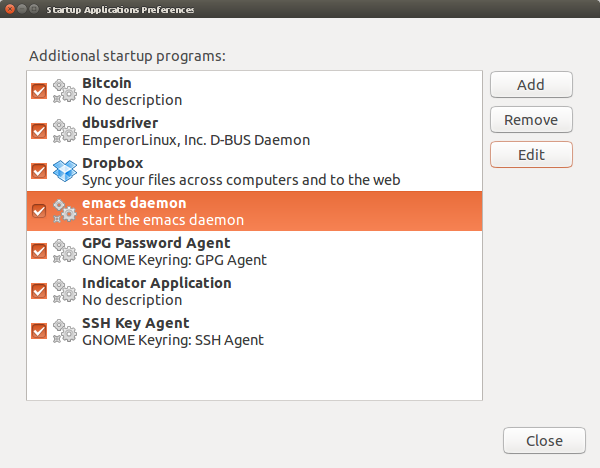
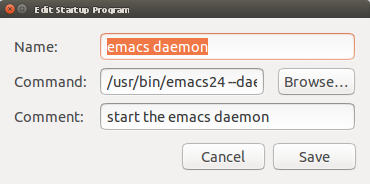
By doing this emacs is always running in the background.
I then call any emacs session with:
$ emacsclient -c
Which I setup in the “Main Menu” like this:
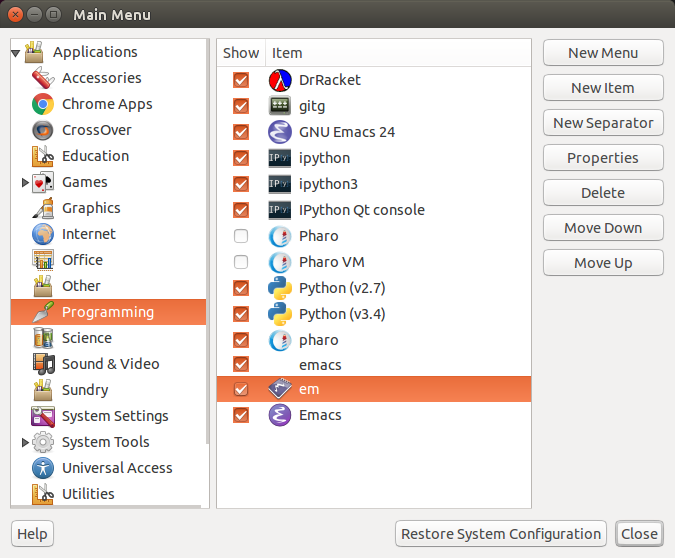
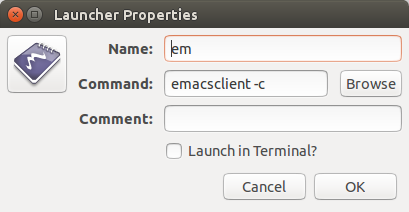
I usually also set to an alias on my system for easy access, like this:
alias em='emacsclient -c'
The very first lines of my .emacs also contains the line:
(server-start)
Which ensures that emacs then sets itself as a server that can serve the emacsclient requests.
This way I always have emacs running as a server, the same instance running wherever and whenever I need it.
Startup Procedure
When emacs starts up, it (usually) reads a configuration file called .emacs.
Emacs users use this file to fine tune their emacs configuration and load various applications, modules, and utility functions.
It has become quite a fashion for people to share these config files on sites like github and bitbucket. Anyone can the download the .emacs files of another user to incorporate useful code into their own configurations.
I have decided to go another way. What I will attempt to do here is describe my current strategies.
Creating your .emacs
I actually keep most of my configuration in an org-mode file called init.org and it is this file that is loaded at the end of my .emacs.
With the lines:
(require 'org)                                ;load org-mode
(require 'ob-tangle)                          ;allow literate programming tangling
(require 'cl)                                 ;allow common-lisp style functions
(org-babel-load-file "~/.emacs.d/init.org")   ;load the init file with source code
To continue please visit init.org.
A 2026 update to the steps above
The screenshots above come from an old Ubuntu desktop and emacs24. The idea is unchanged, but the commands are simpler now:
- Starting the daemon. On any systemd-based distribution, Emacs ships a user service. Run
systemctl --user enable --now emacsonce and the daemon starts with every login. No startup-applications dialog needed, and no version number in the path. - The client.
emacsclient -cstill opens a new frame on the running daemon. Add-a ""(emacsclient -c -a "") and it will start a daemon for you if none is running. (server-start)is only needed if you launch Emacs normally and want it to also act as a server. When Emacs is started with--daemonor the systemd unit, the server is already running.(require 'cl)is obsolete. The oldcllibrary was deprecated in Emacs 27; use(require 'cl-lib)and thecl-prefixed functions (cl-loop,cl-remove-if) instead.- Where the file lives. Emacs looks for
~/.emacs, then~/.emacs.d/init.el, and since Emacs 27 also~/.config/emacs/init.el. Pick one. Since Emacs 27 there is also anearly-init.elthat runs before the package system and the first frame appear, handy for turning off the tool bar without a flicker.
The plain idea
Your config file is a program that Emacs runs every time it starts. Whatever that program does, adding key bindings, loading packages, setting colours, becomes part of your editor. Keeping it as an org file (init.org) means the program is also a readable document explaining itself.
Why it matters
A running daemon means Emacs starts once, and every later window opens instantly with all your buffers, history and open files still there. Combine that with a config you understand line by line and the editor stops being a tool you open and becomes a place you work in.
An analogy: the kettle that is always warm
Starting Emacs from cold each time is filling and boiling a kettle for every cup of tea. The daemon keeps the water hot; emacsclient just pours.
A worked example
# once
systemctl --user enable --now emacs
# in ~/.bashrc
alias em='emacsclient -c -a ""'
;; ~/.emacs.d/init.el
(require 'org)
(org-babel-load-file (expand-file-name "init.org" user-emacs-directory))
org-babel-load-file extracts (“tangles”) the Emacs Lisp blocks from init.org into init.el next to it, and loads that. The tangled file is only rebuilt when init.org changes, so startup stays fast.
Common misconceptions
- “The daemon uses lots of memory.” A typical session uses a few hundred megabytes, about one browser tab’s worth.
- “Closing the window quits Emacs.” With the daemon,
C-x C-ccloses only the client frame. UseM-x kill-emacsto stop the server. - “Copying someone’s config is a shortcut.” It is a fine way to steal ideas, but a config you did not write is one you cannot fix.
How it connects
Emacs, Emacs Lisp, init.org, and Bash for the alias.