
Picolisp Chat Program
Reading this in 2026. These are my study notes from around 2017, when the 32-bit C (pil32) and 64-bit assembly (pil64) implementations were current. Since 2020 PicoLisp is pil21, written in PicoLisp itself and compiled through LLVM; the language, libraries and examples are largely the same, so the ideas here still apply, but file names and internals differ. See Pil Sources and software-lab.de.
Computing | Picolisp | ASM | pil sources
A Study
Once you have downloaded the picolisp sources you will find a folder called misc inside the main picoLisp folder.
This has various example programs that are great to study.
In this article we are going to study the code inside the chat program.
The whole source for this is at the bottom of the article for reference.
Running Chat
Firstly make sure the permissions are set correctly. In bash type:
$ chmod 755 chat
The program works as a chat server. We will first edit the server file to point to the correct binaries and libraries. Then we will open two additional terminals within which we will simulate a chat between two parties.
The file comes with a ‘shebang’ on line 1, this line points the file to the correct pil binaries & sources when running the program as a script.
We will will edit it to point to the right place in your system.
#!bin/picolisp lib.l
change it to:
#!/home/emperor/picoLisp/bin/picolisp /home/emperor/picoLisp/lib.l
Now, I am assuming that you installed picolisp in your home folder. Mine is called /home/emperor.
Do whats right in your particular circumstance.
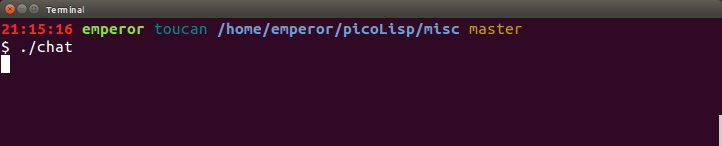
Now the server is ready to run. Inside the folder misc/chat in the terminal run:
$ ./chat
The server is now running and ready to accept connections.
Now open two separate terminals. We are going to use telnet to connect to the server.
telnet uses the following command signature:
$ telnet host port
in this particular case our host is localhost and our port is 4004 as set on line 12 of the source. So type:
$ telnet localhost 4004
you should see the following output:
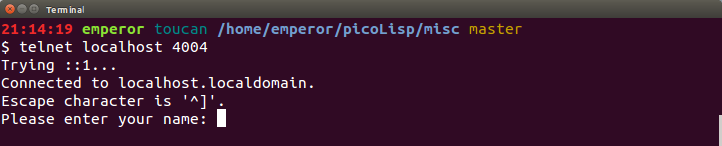
Type in a name and do the same again in the second terminal and you will now is the out put in the first terminal.
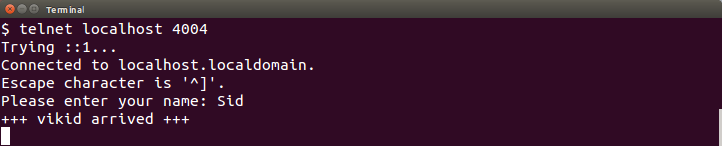
You are ready to chat. So play around.
(Learn about telnet and client-server programming here)
Now you may find it hard to exit from telnet when pressing ctrl-C. Fear not. Telnet captures this sequence as an input and the input is not caught by the terminal it self.
This is the explanation I found on Stackoverflow:
The reason Ctrl+C doesn't interrupt or suspend the connection is that an interrupt signal or a Ctrl+C
often needs to be passed through to the remote end (so you can break programs there, if you're working
on a remote shell), which wouldn't be possible if the telnet client intercepted it for its own purposes.
– blubberdiblub
So if your on Ubuntu or some flavour of linux this should work:
ctrl-]
then
> quit
Now that we have understood how the chat works and played around with it, lets try to understand the code. Its amazing what you can achieve with just 32 lines of code!
Examining the Source
All picolisp programs kind of start the same way.
  1 #!/home/emperor/picoLisp/bin/picolisp /home/emperor/picoLisp/lib.l
  2 # 14jun17abu
  3
  4 # *Port *Sock *Name
Line 1 is a Unix convention to tell the terminal which interpreter to use. In this case picolisp with the library lib.l
Line 2 is a comment telling you when the file was last modified any by who, abu (short for Alexander Burger, creator of picolisp) in this case.
Line 4 tells you which Globals are in use (*Variable, is a picolisp convention).
Line 6 - 9. Here, we define the chat function. Lets ignore it for now as how it is used becomes apparent later.
Line 12 - Working with TCP Sockets.
(setq *Port (port 4004))
we call (port 4004) and set it to the global 
Source of misc/chat:
#!/home/emperor/picoLisp/bin/picolisp /home/emperor/picoLisp/lib.l
# 13jun17abu

# *Port *Sock *Name

(de chat Lst
   (out *Sock
      (mapc prin Lst)
      (prinl) ) )

(setq *Port (port 4004))

(loop
   (setq *Sock (listen *Port))
   (NIL (fork) (close *Port))
   (close *Sock) )

(out *Sock
   (prin "Please enter your name: ")
   (flush) )
(in *Sock (setq *Name (line T)))

(tell 'chat "+++ " *Name " arrived +++")

(task *Sock
   (in @
      (ifn (eof)
         (tell 'chat *Name "> " (line T))
         (tell 'chat "--- " *Name " left ---")
         (bye) ) ) )
(wait)